Borehole Merge
Overview
Borehole information can be merged together following import to Transform.
Version: 3.0+ (Apr 2026)
Usage: Metis Tools --> Project merge...
Borehole merge and identification
Once a site merge has completed, at Stage 3, the user is prompted to select properties to be used as Borehole merge criteria. For this first stage there's a restriction to just using Borehole properties.
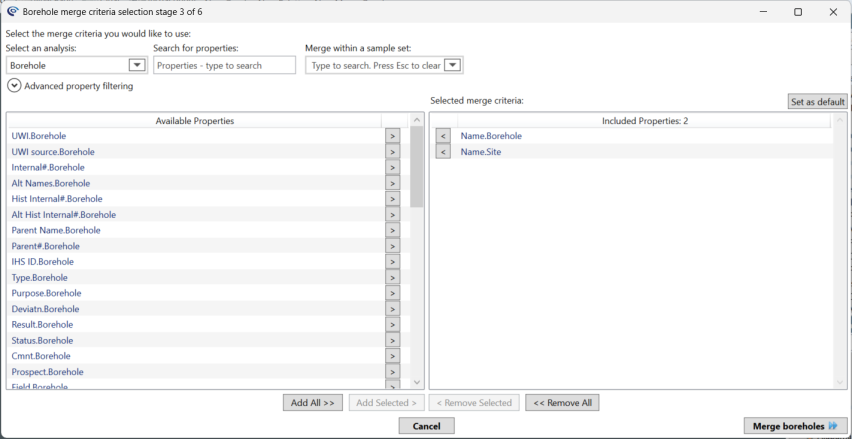
Merge criteria should be selected based on how they group a dataset into distinct entities. For the borehole merge stage a set of default properties are provided that can assist in merging them into distinct groups, these default properties can be added to or removed.
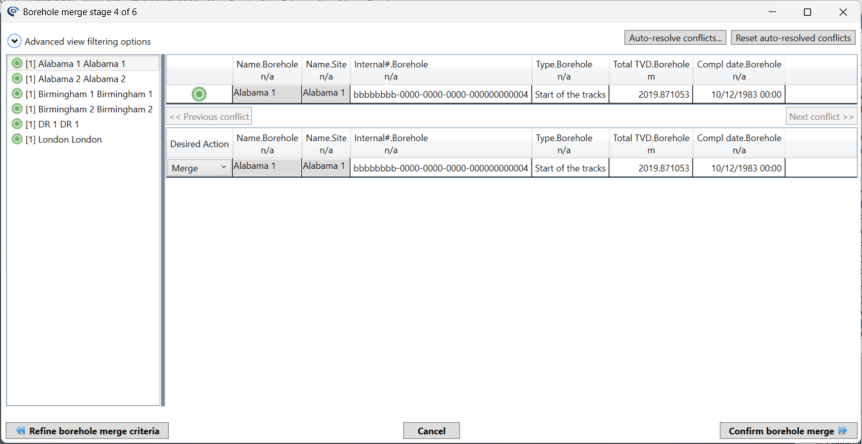
Stage 4 shows you the results of the merge, grouped by the selected criteria. Most Boreholes will hopefully merge without conflict, as shown by the green tick next to the Borehole name, however if you have conflicting data (for example the same Borehole is given different Drillers Reference height values) this will be indicated by the presence of a red cross, and the conflicting property will be shown, with a checkbox allowing the user to specify which value to retain. The number in square brackets tells you the number of rows merging together. You can review all the values (and their latest source) in the right-hand panel, which shows the properties, the source of the data and the merge action to be selected.
Merging the Boreholes in the project is a subtle process. It is really doing two things. First it brings together all the information about Boreholes in the project to merge the information, but secondly it also assigns samples to the created Boreholes.
When running the merge process, the user interface forces you to first merge the Boreholes together and then merge the samples. If you run the merge process again it will remember your choice of criteria allowing you to quickly progress through the Borehole merge stage. It will often to be necessary to run several sample merges with different merge criteria, but typically only one Borehole merge is required.
If the results of the Borehole (or sample) merge are not as anticipated it is possible to Refine borehole merge criteria and see if a better grouping can be found. It is also important to check for missing rows by reviewing the number of rows with no merge criteria.
To progress to the sample merge stage select Confirm borehole merge and continue to sample merge.
© 2026 Integrated Geochemical Interpretation Ltd. All rights reserved.