
How to create and set up a default p:IGI+ project
Use a default p:IGI+ project template to start the software with a predefined structure (artefacts readymade and organised). The template could be a company-defined layout with priority plots, etc, or an individual's customisation to fit a working preference.
Creating a new default project template in p:IGI+
Step 1: Create a new project
-
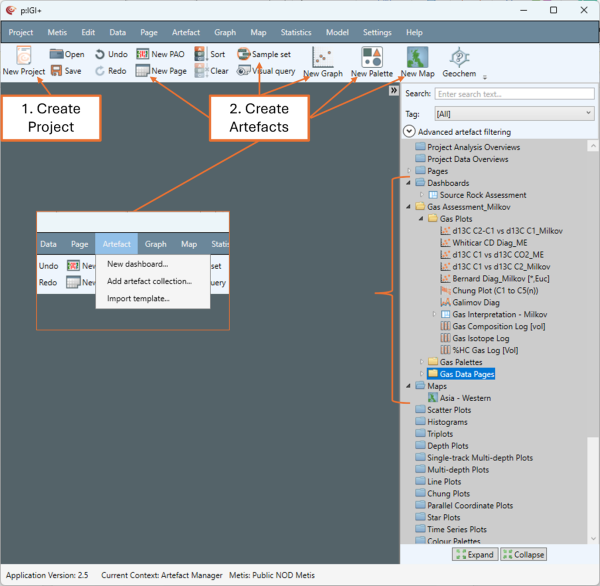
Click the New Project icon from the shortcut icon menu
A default project opens with a set of parent artefact folders (blue).
Step 2: Create new artefacts
-
Use the appropriate shortcut icons to add artefacts (pages, graphs, sample sets, maps etc.) to your blank p:IGI+ project.
-
From the Artefact menu select either New dashboard…, or Add artefact collection… to add a predefined group of artefacts to your blank p:IGI+ project.
-
-
- A dashboard is a pre-arranged group of artefacts arranged in a singular artefact window.
- An artefact collection is a custom folder (yellow) containing several artefacts.
-
Step 3: Save the blank project template
-
Click the Save icon from the shortcut icon menu.
-
Navigate to the location you wish to save your template file. This can be any folder of your choosing - a shared network location is often the most practical.
-
The saved file will have a .pigi2 extension.
Setting the default project file location
Step 1: Set the default project location (optional)
Set this file path to load a custom default project template when you start new p:IGI+ projects.
-
Go to Settings
 Edit settings…
-
Under Project in the Settings window, click Choose file… next to Default project location. Navigate to and select your project template and click Open.
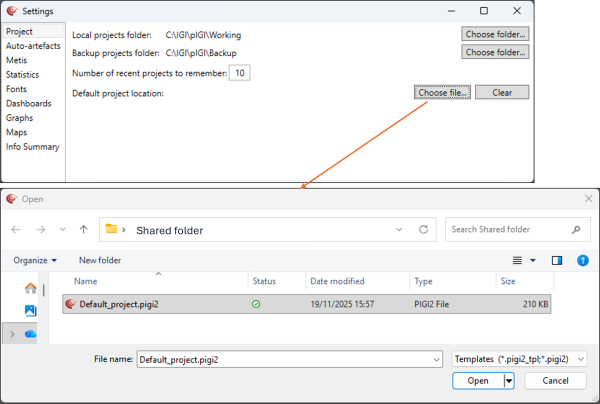
Note: The next time you create a new project, this template will load automatically, with all the pre-generated artefacts in the Artefact Manager, ready to use after data is imported.
© 2026 Integrated Geochemical Interpretation Ltd. All rights reserved.