Well Artefacts in p:IGI+
Overview
The behaviour in version 3.0+ has improved significantly over version 2.x. Instructions for 2.x can be found toward the bottom of the page.
Version: 3.0+ (Mar 2026)
Usage: Importing data / creating using site and borehole manager or from the Data menu
Sites and Boreholes in p:IGI+
In version 3.0+ well artefacts and well manager have been replaced with an integrated site and borehole manager. The Well property group has been replaced with the borehole property group and a site property group has been added that stores the surface geographic location.
Sites and boreholes are fully integrated into a project. Sites enable the projection of data onto maps and boreholes store the necessary information to dynamically calculate sample true vertical depths from measured depths, assign stratigraphic information to samples and manipulate/interact with depth plots.
Sites or boreholes are created by default in p:IGI+ when any data row is imported which includes site or borehole information. This must include at the minimum a borehole name, which is used as the unique identifier for the borehole in the project. Boreholes can also be created by importing borehole only information from p:IGI-3 well manager files, or stratigraphy or Measured Depth-True Vertical Depth tie points from Excel files.
During import in p:IGI+ site and borehole information spread across multiple samples is merged in a very automatic and simple manner. For example if there were two files imported, the first with the header and data row:
| Site Name | Borehole Name | Lat | Long | Site Region | Borehole Result | County |
| Site 1 | Stark-1 | 52.4 | 1.55 | USA | Oil | Texas |
| Site 1 | Stark-2 | 52 | 2 | America | Gas | Texas |
and the second:
| Site Name | Borehole Name | Lat | Long | Site Region | Borehole Result | County |
| Site 1 | Stark-1 | 52 | 2 | UK | Gas | West Virginia |
Then in p:IGI+ two sites called Site 1 and two boreholes called Stark-1 and Stark-2 would be created first time, with the Lat and Long values and the County and Region value given to the site and the Result given to the boreholes. When file 2 was imported the borehole Stark-1 gets auto-merged with the second of the two Site 1's as the properties it uses to compare which have data are identical (Site Name, Lat & Long) and so the first Site 1 gets merged out. The user is told in the import merge feedback text box which values have been replaced.
There is no user control over the merge process to create sites and boreholes in p:IGI+, and this is a deliberate choice to retain a clean, automated import and site and borehole creation process. If the user needs more control Metis Transform is the appropriate tool.
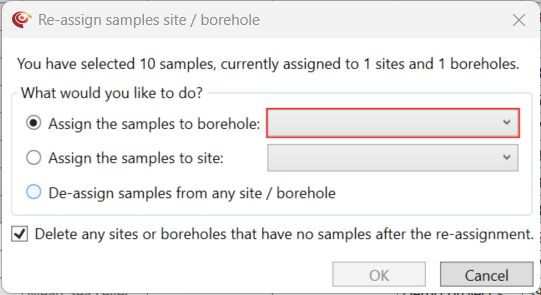
In p:IGI+ a sample can be assigned to a site and/or borehole either at import, or later by choosing the Assign samples to site/borehole... option via spreadsheet. From V.2.1+ the borehole name property on a spreadsheet page was changed to read-only to make it consistent with all other borehole properties. You can assign a sample to a site and/or borehole by selecting & right-clicking on the samples you want to assign and then choosing either the Assign the samples to borehole option (shortcut Ctrl+Shift+W) or the Assign the samples to site option. From here the site and/or borehole can be selected and assigned to, or samples that already have a site and/or borehole can be unassigned from it. After the reassignment any sites or boreholes that have been left without samples can be automatically deleted by keeping the checkbox selected.
Once sites and boreholes have been created they work identically in p:IGI+ and Metis, as described in the general well artefact guide.
Version: 2.1+ (Jul 2022)
Usage: Importing data / typing well names in p:IGI+
Wells in p:IGI+
Well artefacts store well site specific information, depth & deviation information, temperature information and stratigraphic information. Well artefacts play an important role in the system integrating geology, depth and samples.
Well artefacts, or simply wells, are fully integrated into a project. Wells store the necessary information to dynamically calculate sample true vertical depths from measured depths, assign stratigraphic information to samples and manipulate/interact with depth plots.
Wells are created by default in p:IGI+ when any data row is imported which includes well information. This must include at the minimum a well name, which is used as the unique identifier for the well artefact in the project. Wells can also be created by importing well only information from p:IGI-3 well manager files, or stratigraphy or Measured Depth-True Vertical Depth tie points from Excel files.
During import in p:IGI+ well information spread across multiple samples is merge in a very automatic and simple manner. For example if there were two files import, the first with the header and data row:
| Well name | Lat | Long |
| Stark-1 | 52.4 | 1.55 |
and the second:
| Well name | Lat | Long | Country |
| Stark-1 | 52 | 2 | UK |
Then in p:IGI+ a well called Stark-1 would be created first time, with the Lat and Long values given. When file 2 was imported the first values of the Lat and Long would be retained, and the user told in the import merge feedback text box that the values 52 and 2 had been discarded. However the new value for the Country.Well would be updated to now read UK.
There is no user control over the merge process to create wells in p:IGI+, and this is a deliberate choice to retain a clean, automated import and well creation process. If the user needs more control Metis Transform is the appropriate tool.
In p:IGI+ a sample can be assigned to a well either at import, or later by choosing the Assign samples to well... option via spreadsheet. From V.2.1+ the well name property on a spreadsheet page was changed to read-only to make it consistent with all other well properties. You can assign a sample to a well by selecting & right-clicking on the samples you want to assign and then choosing the Assign samples to well... option (shortcut Ctrl+Shift+W). From here the well can be selected and assigned to, or samples that already have a well can have their well unassigned.

Once well artefacts have been created they work identically in p:IGI+ and Metis, as described in the general well artefact guide.
© 2026 Integrated Geochemical Interpretation Ltd. All rights reserved.