Well artefacts
Overview
The behaviour in version 3.0+ has improved significantly over version 2.x. Instructions for 2.x can be found toward the bottom of the page.
Version: 3.0+ (Mar 2026)
Usage: Double-click on site or borehole in the site and borehole list,
Open using the site and borehole manager.
How to use in practice
Sites store site specific information such as location data, and boreholes store depth & deviation information and stratigraphic information. Boreholes play an important role in the system, integrating geology, depth and samples.
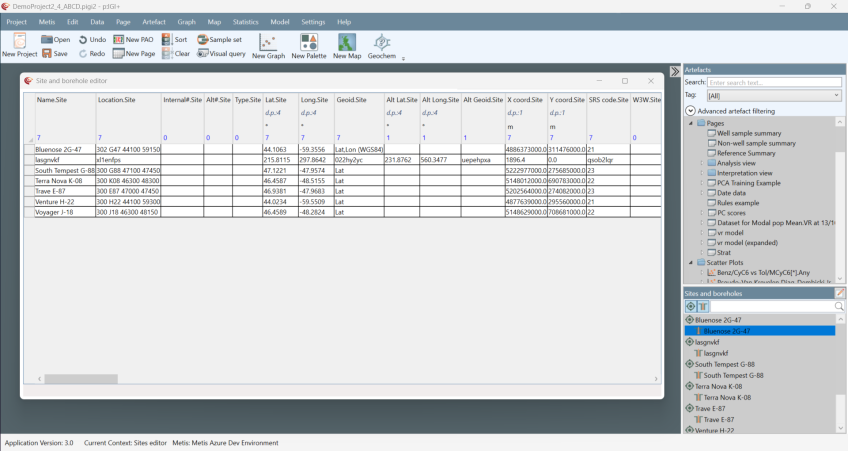
Sites and boreholes are displayed in the sites and boreholes list view below the artefacts. The site and borehole data can be viewed and bulk-edited by either double clicking on the specific site or borehole from the list view or by clicking on the edit pencil button at the top right of the list view.
Boreholes store the necessary information to dynamically calculate sample true vertical depths from measured depths, assign stratigraphic information to samples and manipulate/interact with depth plots in p:IGI+.
To create a new site and optionally a borehole either select the entry off the Data menu or right-click anywhere within the site and borehole editor.
Sites and boreholes can be renamed in the site and borehole editor by overwriting the current value. Using the editor it is possible to bulk edit both sites and boreholes and data can be copied and pasted.
To delete a site or borehole (and associated samples) use the Delete function from the right click menu on the site/borehole in its list view. Deleting a site will delete all associated boreholes and samples, deleting a borehole will delete all associated samples and it will also delete its associated site if the site has no other boreholes associated with it.
Version: 2.1+ ()
Usage: Double-click well artefact in artefact manager,
Drag & drop well artefact into the project workspace.
How to use in practice
Well artefacts store well specific information, location data, depth & deviation information and stratigraphic information. Well artefacts play an important role in the system, integrating geology, depth and samples.

Well artefacts, or simply wells, are fully integrated into a project. Strictly we should consider a well as a wellbore, since it is not uncommon for multiple wellbores to emanate from a single well head. Wells store the necessary information to dynamically calculate sample true vertical depths from measured depths, assign stratigraphic information to samples and manipulate/interact with depth plots in p:IGI+.
To create a new well manually select the New Well icon on the toolbar. The minimum criteria required when creating a well is just a well name. Normally wells are created on import (p:IGI+) or Project merge (Metis Transform).
In version 2.1 we have improved the treatment of wellbores. Wellbores are now no longer only determined by the well name – rather the well is determined using the well name, unique well identifier, country, internal#, ihs#, location, and (lat,lon). The well artefact names have been modified to show the well name, and in brackets the country and lat, lon. This allows user to have multiple wells with the same name, so long as they are in different countries or have different lat, lon.
To rename a well open up its artefact and enter an amended well name within the Well name text box.

To harmonise well names or to remove an unwanted well (and associated samples) from a project, use the Delete function from the right click menu on the well artefact. At this point you will be presented with the following options of what to do with the samples currently assigned to the well being deleted:
- Delete samples associated with the well;
- Assign associated sample to a different well (this is the act of pseudo-harmonising your well name);
- Leave samples in the project unassigned to a well (i.e. in the case of mis assigned outcrop / surface samples).
To harmonise well names once the wells exist, select to delete the unwanted named well(s) and reassign associated samples to the well name you wish to retain in the project.
Populating Well Data
For a well, all data associated with Location, Depth and datum information, Directional drilling data, Stratigraphy and Drilling are managed through the well artefact accessed through the Artefact Manager. Wells can also be accessed through the well icons displayed on maps. Most well properties can be viewed through page views, but on pages the well information columns are display only columns.
The well artefact contains multiple tabs to store the various well information:
- Well info- general information including the well type, along with any user comments
- Location - well coordinate and region information
- Depth - well site and borehole depths and datum’s
- Well Deviation - well deviation surveys, or a list of tie points for MD -> TVD conversion
- Chronostratigraphy & Lithostratigraphy - tables for well stratigraphy. Linked to the relevant Lstrat and Cstrat.Geol analysis group properties
- Drilling - operator and drilling event information
All properties in the .Well analysis group are displayed in the well artefact.
Importing well data
Well data can be imported along with general sample data, but will be auto-merged in p:IGI+, although not in Metis Transform. If you specifically want to import well data from a well data only source, the following options are available:
- Bulk import of general well information - suitable for 'standard well properties' which are simple strings or numbers;
- Bulk import of well stratigraphy tops - suitable for importing new or updated tops information for chrono- and litho-stratigraphy;
- Bulk import of tie points - suitable for importing new or updated tie points mapping measured (drillers) depth to true vertical depth;
- Bulk import of well information from p:IGI-3 well manager files.
- Working with electronic logs (LAS) data.
© 2026 Integrated Geochemical Interpretation Ltd. All rights reserved.