Import Borehole (well) Info from Excel
Overview
It is possible to import large volumes of borehole (previously well) data from Excel files. During import, users can add or update borehole and associated site information. This is a useful way of bringing in borehole/site 'metadata' from an external source.
The import well data option in version 2.5+ has been updated to become a borehole and associated site information import. This will create boreholes and attach them to a site if site data is present in the import file. Like with earlier versions of the software the bulk import of site & borehole data requires the imported file to conform to a fixed structure. An example file is attached here: Borehole_Info_ImportV3
Version: 3.0 (Mar 2026)
Usage: Project --> Import site/borehole data...
How to use in practice
Unlike the Excel import for sample data, the bulk import for borehole and associated site information requires that the imported file conform to a fixed structure on the first sheet of the Excel file (example file above). The property headers in red text must be present in the first 5 columns and the Name.Borehole property (bold) must be populated with data for the file to be valid. Additional borehole and site properties can occupy additional columns in the worksheet (all possible site/borehole properties are listed in the second Excel worksheet), and the unit where this is required must be specified. An example would look like:

Each row must include a borehole name in the Name.Borehole column.
To import the Excel file, go to Project --> Import site/borehole data... and select the desired file from the file picker. Once you have chosen the file, you will see the following dialogue:
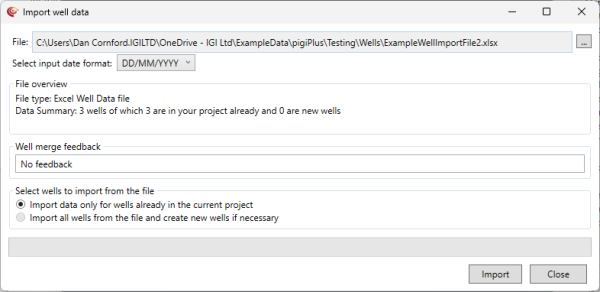
In this dialogue, you can select various options. The top section allows you to change the file and select the correct date format for any applicable borehole date-time properties. The next "File overview" section gives you a summary of the number of boreholes in the file, and how these relate to the boreholes currently in your project.
The next section lets you select what to import from the file. You can select to only import data from boreholes already present in the current project, or to import all boreholes in the file. In general, you probably only want to import additional data for the boreholes in your project.
Select Import to begin the import process, which will show a progress bar. This will update the borehole and associated site properties with the values from the file.
© 2026 Integrated Geochemical Interpretation Ltd. All rights reserved.