How to import, view and edit non-quantified values in p:IGI+ v3
p:IGI+ now supports the import, storage and display of non-quantified (n-q) values (for example, <0.5mg/L, >1000ppm, BDL, etc.) alongside numeric analytical data. N-q values can be imported with your analytical results and, where required, supplemented with an inferred numeric value for interpretation and visualisation.
Importing non-quantified values
Step 1. Import data
- Import analytical data using the standard p:IGI+ import process.
Note: Any n-q values included in the source data are imported automatically alongside the numeric data. No additional import options or configuration are required.
Refer to How to import sample data into p:IGI+ from Excel for help with importing data.
Viewing non-quantified values
Step 1. Open a page
1. Open a page in one of the standard ways by either:
a. Double clicking on a previously created page
Or
b. Choosing New Page to create a new page using, e.g. All properties with data, and
c. Clicking Create
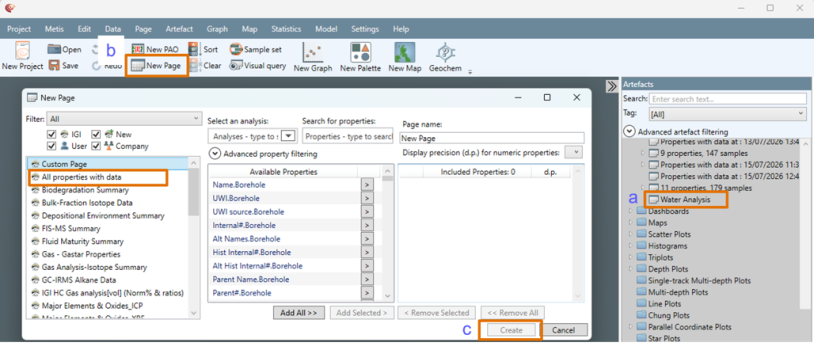
Step 2. View non-quantified values
1. Navigate to a property containing n-q values within the page.
Note: N-q values are displayed alongside all other analytical data and can be viewed in the same way, however n-q values:
a. Are coloured purple.
b. Display the unit in which they were reported where relevant - e.g. < or > values will display a unit but BDL or Trace will not.
c. Are counted in the total in the column header (in blue), and in the count of n-q values (in purple).
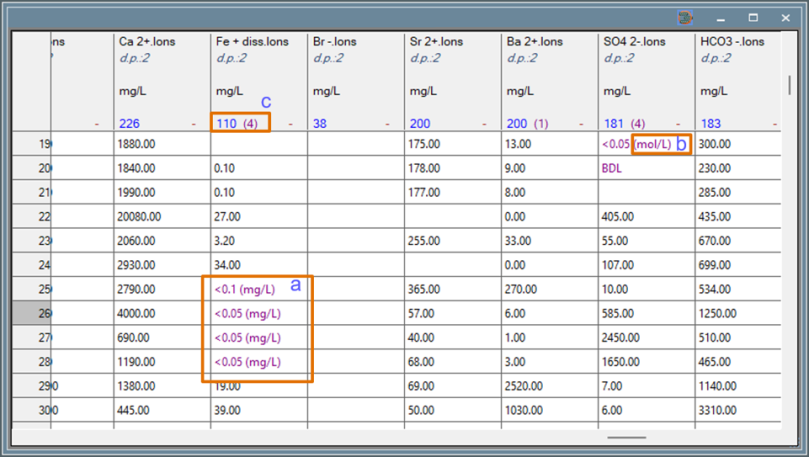
Adding and deleting inferred and non-quantified values
It is recommended that n-q values are imported with the numeric analytical data, but they can also be typed or pasted into a cell.
Step 1. Adding inferred values
An inferred numeric value can be added to the same cell as an n-q value. Inferred values are treated as standard numeric values and can be used in graphs, plots and other artefacts.
1. Type or paste a numeric value into a cell currently occupied by a n-q value ensuring the property is displaying the correct unit (e.g. if the n-q value is <0.05 mg/L and an inferred value of 0.05mg/L is required, ensure the property is displayed in mg/L when the inferred value is added).
Note: The inferred value is stored alongside the original n-q value. The original n-q value is retained and is not overwritten. The text colour for inferred values is purple, to indicate there is also a n-q value in the cell. Adding an inferred value does not increase the overall count, as the n-q value and its inferred value are treated as a single data entry.
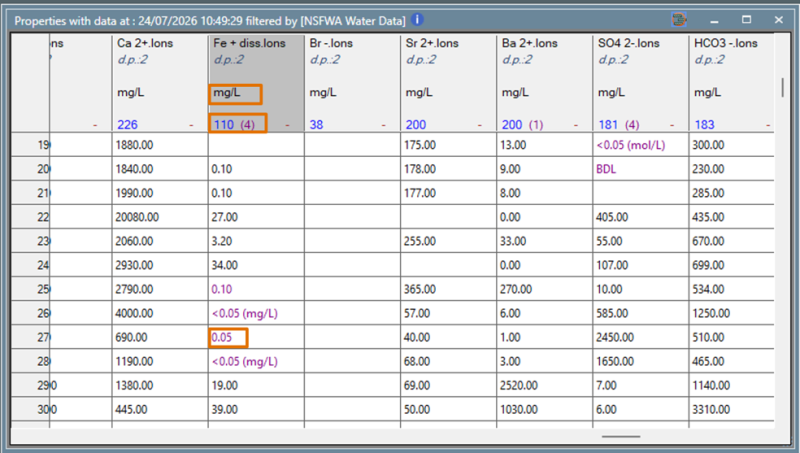
Step 2. Deleting inferred and non-quantified values
- Select the cell containing the n-q value and inferred value.
- Press delete once to remove the inferred numeric value while leaving the original n-q value intact.
- Press delete a second time to remove the n-q value itself.
Note: Where there is no inferred value, the first delete will remove the n-q value.
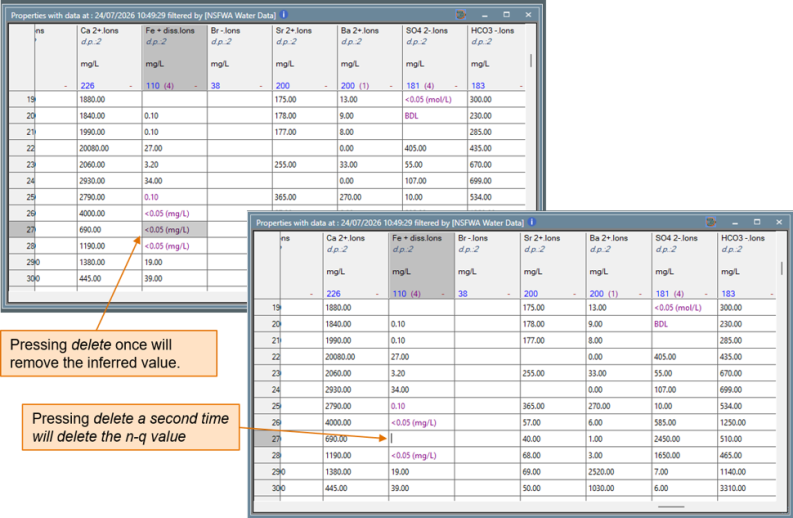
Note: Support for storing and managing n-q values in Metis is planned for a future release.
© 2026 Integrated Geochemical Interpretation Ltd. All rights reserved.